


Loop Master™: Color Jam Sort
4.8623.00 Reviews
App Specs
- Version
- 1.1.3
- Updated On
- License
- Free
- Downloads
- 1,000,000+
- Developer
- Pleasure City
- Categories
- Puzzle
- Platform
- Android
Screenshots
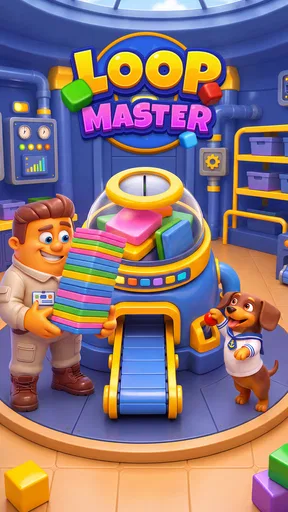
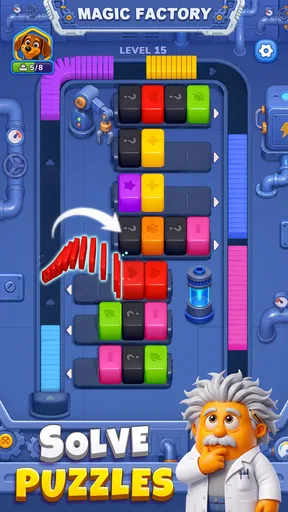
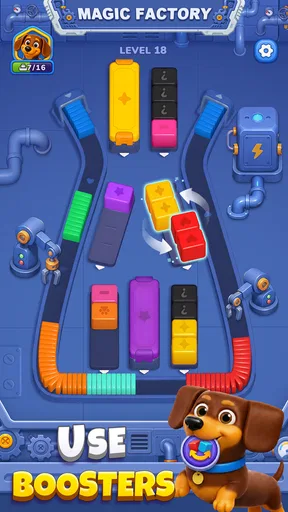

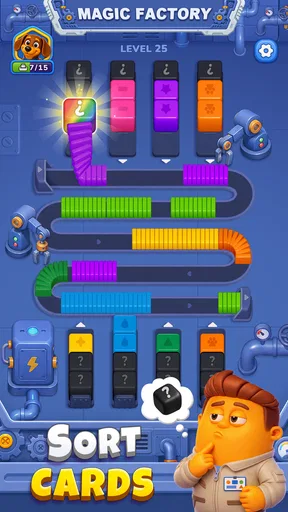


 Analysis by AppCompare
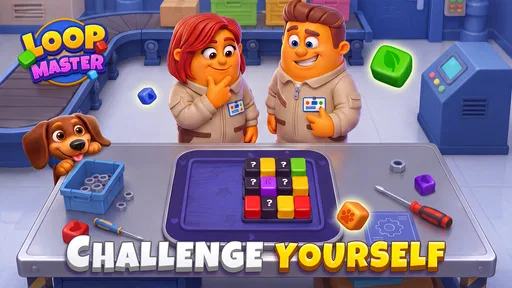
I find conveyor-based color sorting most satisfying when a puzzle looks simple at first, then makes me pause before I commit to a move. Loop Master™: Color Jam Sort is a free puzzle game built around that kind of problem: colored cubes move through a looping conveyor flow, and the aim is to get each one to its matching box. The idea is easy to grasp, but keeping track of what is approaching and what needs to be cleared is where the attention comes in. I’d recommend it to someone who likes short, visual sorting challenges more than long stories or action-heavy play.
A good fit for short, focused breaks
I can see this being especially useful when I have a few quiet minutes but do not want to start a game that demands a long commitment. For example, while waiting for an appointment, I can focus on one puzzle, scan the colors, and work out a sequence without needing to follow a story or remember a complicated setup. The trade-off is that the moving arrangement still asks for attention: it is a small break, not something I would play while walking or trying to listen closely to someone.
The best way to approach a session is to treat each level as a compact planning exercise rather than a speed challenge. I would give myself a moment to understand the whole loop, pick a likely priority, and then act. If I am tired or keep losing track of the colors, stopping and returning later is more sensible than tapping through in frustration. That makes the game a better match for deliberate pauses than for play in every spare second.
When the conveyor flow gets confusing
The main source of friction is also the game’s central appeal: several colors and destinations can make a compact puzzle harder to read than it first appears. When I’m focused on the cube nearest the box, it’s easy to overlook how a choice may affect the rest of the loop. I get better results by scanning the whole arrangement before acting, rather than treating each cube as a separate little task.
A useful habit is to identify which color has the clearest route and which one looks most likely to cause a backup. That quick check helps me avoid reacting to the most obvious cube while leaving a more awkward color unresolved. It also makes a failed attempt more informative: instead of simply trying faster, I can change the order in which I think about the colors.
This is a color-sorting puzzle, not a test of reflexes in the usual sense. The challenge comes from reading the arrangement and planning around the moving loop. If you enjoy spotting a clean sequence, that can feel pleasantly absorbing. If you prefer puzzles with explicit clues or a calm, static board, the conveyor motion and visual busyness may feel like extra work rather than part of the fun.
Start with a whole-board scan
My most practical tip is to pause briefly at the start of a level and mentally group cubes by color and destination. Then look for the color whose path seems least straightforward. This small routine is more useful than making a quick first move just to see what happens, because the first move can shape how easy the rest of the flow is to understand.
Worth Reading Before You Choose

EA SPORTS FC Mobile 26 Is a Bigger Football Game, but It Takes Time

Flipboard Shows What News Apps Must Do Beyond the Feed

Switching to Android Auto Means Rethinking Your Driving Routine

Google Calendar Makes a Crowded Week Easier to Manage

Ludo King Makes the Most of the Minutes Between Plans

Baby Panda World Brings Quick Play to Modern Phones, but Its Game Library Feels Busy
When I lose track of the loop, I stop trying to remember every cube’s position. I narrow my attention to one question: which color should I resolve next without making another color harder to handle? That reduces the mental clutter and helps me make deliberate choices. It is a simple approach, but it suits a game whose puzzle is about coordinating colored pieces through a shared route.
The game is from Pleasure City, and its store presentation describes a focused loop-and-box sorting premise. That focus is a strength for quick sessions, though it also means this is not the right pick if you want a broad collection of unrelated puzzle styles. I would choose it for a specific mood: when I want to concentrate on arranging colors and working out an order, without needing to learn a complicated set of rules first.
Before playing: sensible setup checks
The game is listed as free, with in-app purchases ranging from $0.99 to $99.99 per item. I’d treat those purchases as an optional part of the experience rather than a reason to spend automatically. If you are installing it for a child or sharing a device, it is sensible to review purchase controls on the device beforehand. The content rating is Everyone, but that does not remove the value of checking the settings that govern spending on a shared account.
It is also worth confirming that your device meets the listed minimum operating-system requirement of 7.0 before installing. If an install or launch does not work as expected, checking the available storage, connection, and operating-system version is a practical first step. Those checks are general troubleshooting, not a claim that the game requires any particular permission or network behavior.
The current version is 1.1.3. If something behaves unexpectedly, I would first make sure the installed copy is up to date through the relevant app store, then close and reopen it. That basic sequence often helps distinguish a temporary device hiccup from a repeatable issue. If the problem continues, noting what happened and when gives you a clearer description if you decide to seek support.
Because the game’s challenge depends on distinguishing colors and following a moving arrangement, comfort with the screen matters. I’d play somewhere I can look closely rather than while walking or splitting attention between several tasks. If a puzzle suddenly seems confusing, it may be more useful to reposition the device or take a short visual break than to keep tapping at a pattern I’m no longer reading accurately.
Recovering a muddled run
When I make a poor choice, I avoid immediately repeating the same sequence at speed. Instead, I review the board and identify the point where my plan stopped making sense. Was I concentrating only on one color? Did I miss a destination that would have been easier to clear earlier? A small change in the order of attention can be more revealing than random experimentation.
If I cannot tell what the loop is doing, I take a moment to let the visual flow settle in my mind before acting again. The point is not to assume that the game has malfunctioned; it is to give myself a chance to read the arrangement. That distinction matters in a sorting puzzle, where a confusing screen can come from a rushed decision as easily as from a technical issue.
For a genuine interruption, I use ordinary recovery steps: return to the game, check whether it responds, and restart it if it remains stuck. I would avoid repeatedly tapping while the screen is unresponsive, since that makes it harder to tell whether the game has recovered. If the same issue returns after a restart and a basic update check, recording the level or situation is more useful than guessing at a cause.
One trade-off is that a puzzle built around a looping arrangement asks you to keep visual context in mind. That can be engaging during a quiet break, but less comfortable when you are interrupted every few seconds. I would not pick it for a moment when I need to stop instantly and resume without having to reorient myself. For that kind of use, a turn-based puzzle with a static board may be easier to put down and pick up again.
When the device, not the puzzle, may be the issue
If the game feels sluggish or the display is difficult to follow, I would first consider the device and surroundings rather than assuming the puzzle itself is at fault. Closing other demanding apps, checking that the screen is clean, and moving to a place with fewer distractions are simple steps that can improve a play session. These are general checks; they do not imply that a particular device problem is known to affect this game.
If the difficulty is specifically about distinguishing colors, changing the room lighting or screen angle may help. It is also fair to decide that this visual format is not comfortable for you. A different puzzle with larger, less crowded pieces or clearer non-color cues would be a better fit if color recognition is tiring or the loop is hard to track on your screen.
It has a 4.8 average rating from around 62,000 ratings, and more than one million installs. Those figures suggest that many players have tried it, but they do not tell me whether its particular visual style will suit you. I’d put more weight on whether you enjoy planning a sequence in a moving color-sorting puzzle than on popularity alone. Pleasure City has made the core idea easy to understand; whether it stays enjoyable depends on how much you like working through that kind of constraint.
What to expect from the puzzle style
Players coming from match-three games should expect a different kind of decision. There is no reason here to chase a chain of combinations across a grid; I get more value from thinking about destinations and the order in which colors need attention. Someone who likes the immediate visual reward of matching tiles may find this less lively, while a player who enjoys untangling a sequence may find the conveyor setup more satisfying.
It also differs from a traditional static sorting board. A fixed layout lets me inspect every piece at leisure, whereas a loop asks me to keep track of how the pieces relate as they move through the shared route. That gives the puzzle its particular tension, but it is also why I would choose a static alternative on a small screen, in poor lighting, or when I expect frequent interruptions. The distinction is practical: this game suits active visual tracking, not just casual color matching.
Who I’d recommend it to
I can see this working well for someone who wants a compact mental break during a commute, while waiting for an appointment, or between everyday tasks—provided they have enough attention to read the loop. A realistic way to play is to complete a brief session during a quiet pause, then stop when the visual pattern starts to blur. The game’s straightforward premise makes it approachable, while the need to plan keeps it from feeling like simple color matching.
Compared with familiar match-three games, this is less about making combinations on a grid and more about getting colored pieces to the right destinations through a shared conveyor flow. Compared with classic static sorting puzzles, the loop gives the arrangement a sense of movement, but that same movement can make it harder to scan at a glance. If you want a relaxed board that stays still while you think, another sorting game may suit you better. If you enjoy tracking several colors and deciding what to handle first, this one has a clearer reason to stand out.
The game is rated Everyone, which makes it broadly approachable in content terms, but I would still consider the individual player’s patience for visual puzzles and the device’s purchase settings. Its free entry point makes it easy to try, while optional in-app purchases mean families should be mindful of how spending is managed. I would not recommend paying for anything unless you understand what it offers and are sure it addresses something you actually want from the game.
My verdict is that Loop Master™: Color Jam Sort is worth trying if you like deliberate color-sorting challenges and do not mind keeping an eye on a looping arrangement. Its best quality is the way a simple goal can make me think about order rather than just speed. Its main limitation is equally clear: the moving, color-led puzzle can become hard to parse when I’m tired, distracted, or looking for a slower static board. I’d give it a chance for focused, short sessions, and switch to another puzzle style if the conveyor flow feels more confusing than satisfying.
Pros
- Easy-to-understand rules make it approachable for casual players.
- Color-sorting puzzles offer a satisfying sense of progress.
- Short levels fit neatly into quick breaks.
- Increasing difficulty keeps later stages engaging.
- Bright colors make pieces easy to distinguish.
Cons
- Some color combinations may be difficult for players with color-vision deficiencies.
- Repeated sorting mechanics can feel monotonous over time.
- Later puzzles may require several attempts to solve.
- Ads or optional purchases may interrupt the experience.
- Small pieces can be tricky to tap accurately on compact screens.
FAQs for Loop Master™: Color Jam Sort
What is Loop Master™: Color Jam Sort?
Loop Master™: Color Jam Sort is a casual sorting puzzle built around arranging colorful loops or similar pieces into the correct groups. Its main appeal is the simple, visual challenge: study the pieces on the board, choose where to move them, and work toward a tidy arrangement. It is designed for short play sessions, though later puzzles may require more careful planning and several moves ahead.
How do you play Loop Master™: Color Jam Sort?
The basic goal is to sort the colored pieces so that matching colors are grouped together, following the rules shown in each level. Tap or drag a piece to move it into an available position, then keep sorting until the board is complete. Available spaces and move options can affect your strategy, so it helps to check the whole layout before acting. Controls and level rules may vary slightly as you progress.
Is Loop Master™: Color Jam Sort free to download and play?
The game may be offered as a free download, but availability, pricing, and included features can differ between the Android and iOS versions and by region. Like many mobile puzzle games, it may include advertising, optional in-app purchases, or both. Check the store listing on your device for current details, including any purchase options, age rating, and whether an internet connection is needed for particular features.
Does Loop Master™: Color Jam Sort work offline?
Some puzzle levels may be playable without an internet connection, which can make the game convenient for travel or quick breaks. However, features such as advertisements, rewards, events, cloud saves, or account-related functions may require connectivity. Offline access can also depend on the version installed and whether the game has completed any initial setup. For the most reliable information, check the app’s store description and test access before relying on it offline.
Is Loop Master™: Color Jam Sort suitable for children, and what should parents know?
The color-sorting puzzle format is generally easy to understand and does not require advanced gaming experience, but suitability depends on the child and the specific content and features in the current release. Parents should review the store age rating and privacy information, and check whether the game contains ads, in-app purchases, or links to external services. If a child plays, consider using the device’s purchase controls and parental settings.


